
Define what needs to move, in which direction
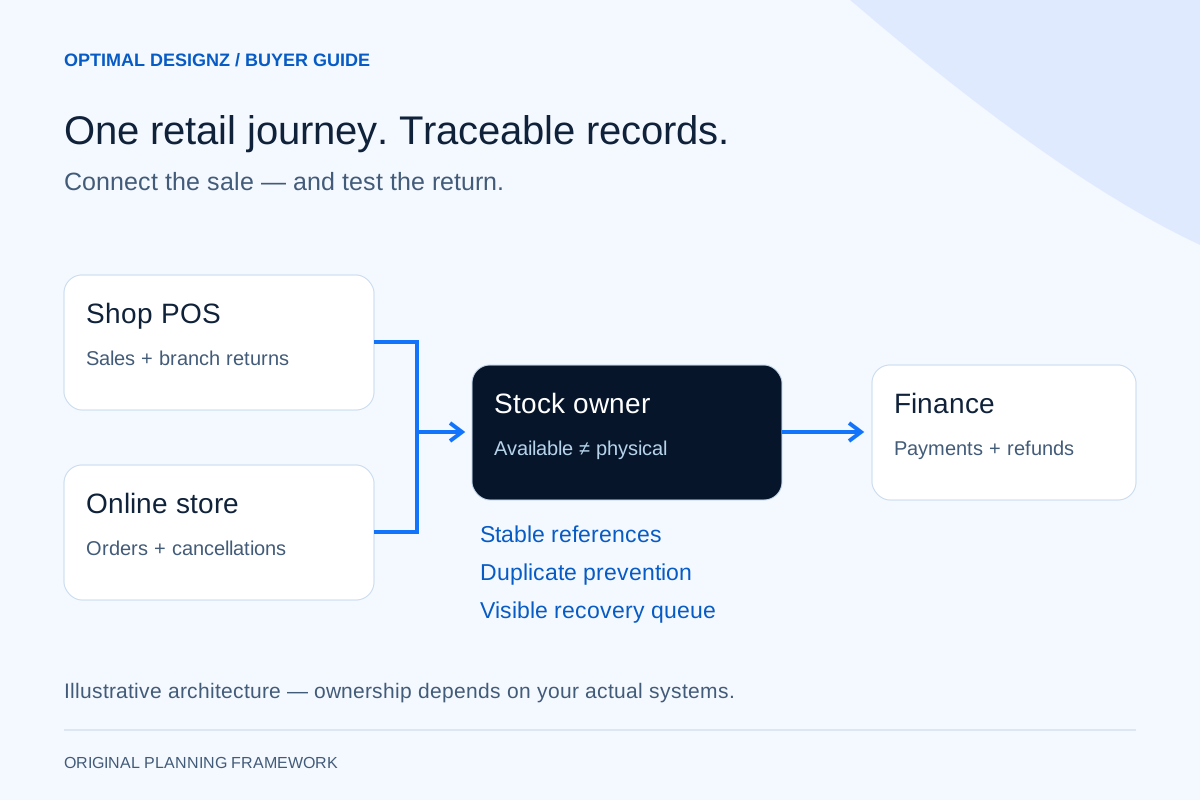
An integration can connect products, prices, stock availability, orders, customer references and fulfilment status. Not every field should move both ways. If the till and online store can overwrite the same price independently, a connection may spread conflicting changes faster. Write a record-ownership table before discussing real-time synchronisation.
For each record, define its owner, unique identifier, permitted destinations and update trigger. Ask whether the provider supports the required operations in your account, regional edition and plan. A familiar platform logo is not evidence that every stock, return or accounting operation is available.
| Record | Decision to agree | Acceptance question |
|---|---|---|
| Product and variant | Which catalogue owns the SKU, barcode and variant? | Does the same physical item match across both channels? |
| Stock by location | Which system owns available and reserved quantities? | Can both channels sell the final unit? |
| Order | Which system owns fulfilment and cancellation? | Does a cancelled order release the correct reservation? |
| Payment and refund | Which provider confirms the financial outcome? | Can a repeated message create another refund? |
| Finance posting | Which approved mapping handles sales, fees and tax? | Do totals reconcile to the source transactions? |
Available stock is not always stock on the shelf
A physical count, a reserved quantity and a sellable quantity answer different questions. If ten units are physically present and three are reserved for paid orders, offering all ten online risks overselling. Define how reservations, damaged items, transfers, receipts and returns affect availability at each location.
Shopify's developer documentation distinguishes inventory quantities and states. That is a provider-specific example of why the field meaning matters: do not assume another POS uses identical terms or state transitions. Map the actual records and events in the selected products, and agree how long an availability update may take.
Walk one order through the whole business
Use a representative order with a product variant, a delivery or collection method and a payment. Check when stock is reserved, when staff can fulfil it, which receipt or invoice is created and how the customer receives confirmation. The order should retain stable references across systems so staff can trace it without guessing from an amount and a surname.
Then reverse the journey. Cancel an unfulfilled order, refund one item from a multi-item order and return an online purchase to a shop if that is an offered service. Decide whether the returned item can be resold, which location receives it and whether a refund requires approval. Payment reversal and stock restocking are separate decisions.
A worked exception: refund money without double-counting stock
Consider this hypothetical scenario, not a client result. A customer buys two units online and returns one to a branch. The cashier scans the original order reference, checks the permitted return and marks the item damaged. A successful refund should update the payment record and return status, but the damaged unit should not become available for sale.
Now repeat the refund event to simulate a delivery retry. The integration should recognise the already processed event or business operation and avoid posting a second refund or increasing stock again. If the finance connection is unavailable, the transaction needs a visible pending state and a controlled recovery path rather than a second manual entry that nobody later reconciles. This is the type of exception a sales-only demonstration can miss.
Plan for delayed, repeated and out-of-order messages
Many connections receive event notifications called webhooks. Receiving a notification does not mean every downstream system has completed the requested change. Store a processing record, check authenticity and permissions, and distinguish receipt from completion. Give staff a way to locate failed or delayed business transactions.
Stripe documents duplicate and out-of-order event handling for its own webhooks; Microsoft describes the risks of repeated operations in retrying integrations. These references support engineering precautions, not a claim that your chosen POS has the same delivery guarantees. Ask the implementer to demonstrate its actual retry, duplicate prevention and reconciliation behaviour for the connected products.
Keep sales, payment settlement and accounting separate
The gross sales total is not necessarily the amount paid into the bank. Fees, refunds, settlement timing, disputed payments and adjustments can create differences. Match order and payment references, then let the responsible finance team approve how transactions enter the accounting system. A bank deposit should not be treated as a new sale when the original order has already been posted.
Agree a reconciliation report showing source totals, destination totals, unmatched records and the person responsible for resolving a difference. Define the reporting period and treatment of pending transactions. The purpose is to explain discrepancies; a dashboard that shows two totals without a traceable record list is not a reconciliation process.
Use a launch checklist built around failure cases
Test with authorised sample records before connecting live stock and payments. Include a sale on each channel, simultaneous demand for the last unit, a partial refund, an unavailable provider and a branch transfer. Record the expected state in every system, the observed result and the owner of any correction.
Before switching on, agree the initial stock snapshot, any temporary change freeze, the cutover window and the rollback approach. Retrying a sync with an old snapshot can overwrite a legitimate sale, so a rollback plan must explain what happens to transactions created after the switch. Start with a manageable branch or catalogue scope where practical, and monitor exceptions after launch.
- The same SKU and variant resolve to the same physical item.
- Repeated events do not duplicate a sale, refund or stock movement.
- Cancelled reservations release the right quantity at the right location.
- Damaged returns remain unavailable until an authorised disposition.
- Payment and finance records retain traceable source references.
- An outage produces a visible queue or exception, with a named recovery owner.
Common questions about connecting POS and ecommerce
Can we keep our existing POS? Possibly, if its supported interfaces and contract allow the required operations. Confirm device versions, account plans, regional availability and vendor constraints before promising a connector. File exports may support a limited periodic process but should not be described as a live transactional connection.
Does integration stop overselling completely? Not automatically. Update delays, concurrent sales, inaccurate counts and uncontrolled manual changes can still create conflicts. Define reservation rules, acceptable latency and a process for investigating differences, then test the last-unit scenario.
Do we need a new online shop? Not necessarily. An integration may connect the current store if its data model and interfaces fit the workflow. Compare a supported connector, a smaller custom connection and replacement against the same end-to-end tests and operating costs.
Saudi retail: bilingual workflows and separate invoice review
Use actual SAR transactions, branch permissions and the Saudi provider accounts. Include an Arabic/English sale, partial refund and return where those languages and operations are required. Identify the source of product identifiers and the staff authorised to correct a branch stock difference.
Treat any connection to an invoicing platform as a separate, finance-reviewed scope. Keep its identifiers and failure states traceable to the sale and return. A successful POS-to-store sync is not evidence of ZATCA approval or of satisfying every invoicing obligation; the responsible specialists must review the applicable requirements.
Related services and next steps
Sources and further reading
Check source guidance directly, especially where platform details or requirements can change.